Quickstart
Zero to a working crew in your Slack workspace in fifteen minutes.
Get your Awk team running in your Slack workspace. No infrastructure to set up — we handle everything.
Before you start
You'll need:
- →Slack workspace with admin access to install apps
- →GitHub organization with admin access to install the GitHub App
- →Optionally: Jira Cloud project and Google Workspace or Microsoft 365 for P.Chief
See Requirements for the full checklist.
1. Create your account
Head to awkteams.ai and click Start free trial. Sign in with Google, Microsoft, or a magic link. If your company already has an account, ask its owner for an invitation — a matching work email domain doesn't add you to it on its own.
2. Set up your team in the console
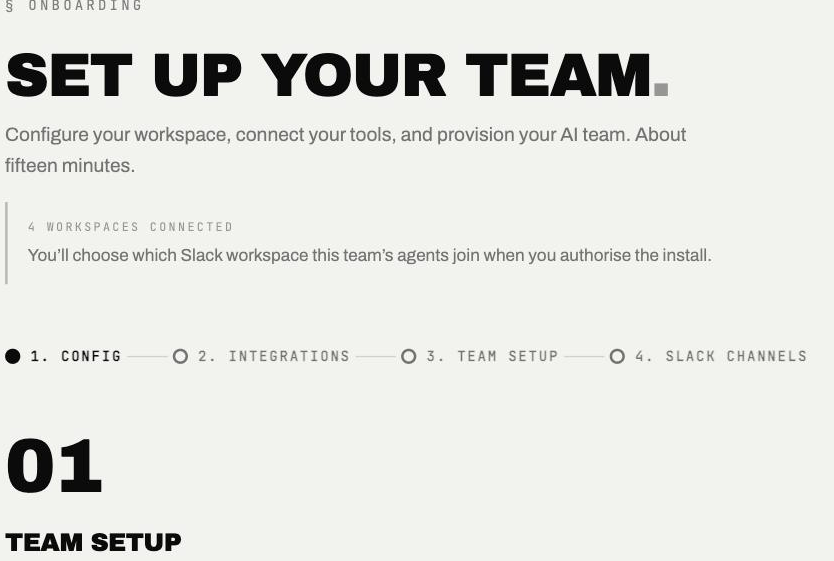
The onboarding wizard takes about fifteen minutes and runs in four steps: configure the team, connect your tools, set up the team, and choose Slack channels.
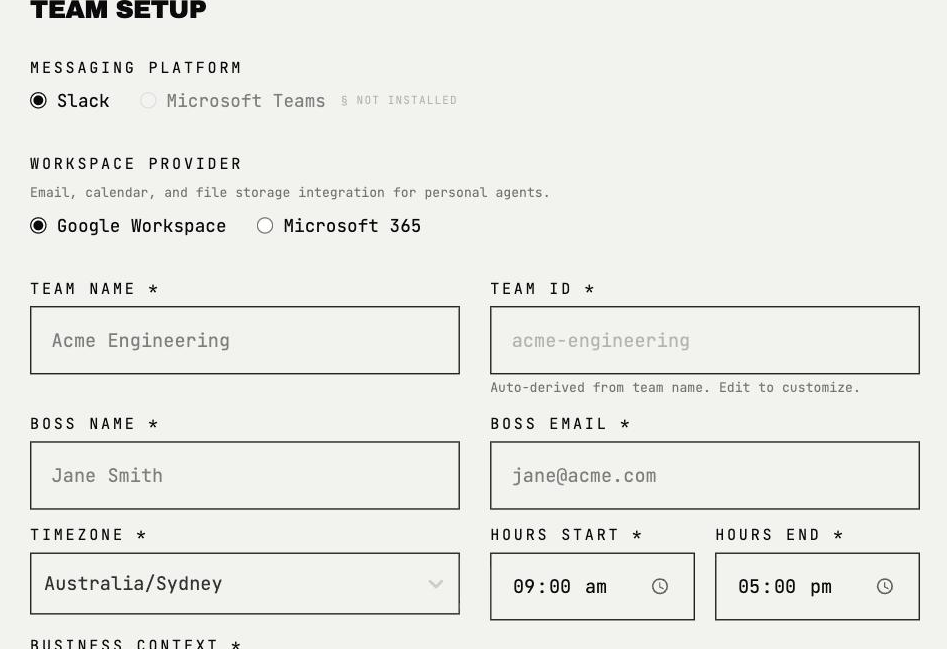
The first step configures the team: pick your messaging platform and workspace provider, then name the team and set its working hours.
3. Connect your tools
In the wizard's Integrations step:
- →Install the GitHub App on the repositories you want agents to work in
- →Optionally, install the Awk Jira app on your Jira Cloud site and pick the projects agents can see — see Jira integration
P.Chief is set up per person, after the team is running — see P.Chief setup.
4. Add the agents to Slack
Each agent joins your workspace with its own Add to Slack button — one click per agent — and you choose the channels they'll work in.
5. Choose your plan
| Plan | Teams | Parallel workstreams | Price |
|---|---|---|---|
| Starter | 1 awk team | Up to 5 | $499 / mo |
| Growth | Up to 3 | Up to 25 per team | Contact us |
| Scale | Up to 20 | Up to 100 per team | Contact us |
Start on Starter — every new account begins on the Starter plan with a free trial of up to 14 days on the monthly fee, plus 3,000 trial credits ($30 value). Your trial clock starts on your first Slack message to your awks, and ends at 14 days or when your credits are used up — whichever comes first. If your credits run out inside the 14 days, a short grace window lets you top up (currently 24 hours to add $50 in credits) — top-ups don't extend the 14-day calendar. Move to Growth or Scale whenever you outgrow Starter. Token usage (LLM calls) is the only variable cost — drawn from your prepaid credits at $0.01 per credit.
6. Say hello
In your Slack workspace, message the bot directly:
@OG-Awk hi — what can you do?
If OG replies with its capabilities, you're live. Try something real:
@OG-Awk build me a /signup endpoint
OG posts a plan for you to approve, builds it, then asks you to approve opening the pull request.
A good first ticket
Point your awks at something scoped and self-contained — a bug fix, a small feature, a test-coverage pass, a refactor of one module. That kind of work moves cleanly from ticket to PR and gives you a clear first result to review.
What to read next
- →Meet the crew — what each agent does and example queries
- →Jira integration — how to assign tickets to agents
- →P.Chief setup — connect your email and calendar