Meet the crew
OG, QA, Oracle, P.Chief — what each agent does and how to talk to them.
Your Awk team ships with four specialist agents. Each has a distinct role, its own set of tools, and a clear boundary on what it can and cannot do.
AWK OG — the engineer
Takes tickets, writes code, opens pull requests, and runs tests. Hands off to QA when the work is ready for review.
What OG connects to: GitHub, Jira
Example queries:
@OG-Awk pick up PROJ-318
@OG-Awk build me a /signup endpoint with email validation
@OG-Awk refactor the auth module to use JWT
@OG-Awk what's the status on that PR?
What OG can do: Read tickets, write code, create branches, open PRs, run tests, comment on issues, transition Jira statuses. Spin up a running instance and share a live, sign-in-protected preview URL.
What OG cannot do: Merge pull requests (QA reviews first, then readies the merge for your approval in Slack) or access your email.
AWK QA — the reviewer
Checks the build does what the ticket asked. Reviews diffs with fresh eyes, runs integration checks, flags regressions and security risks, comments inline on PRs. Sends the work back to OG when it doesn't pass; approves when it does. Once a PR is green, QA readies the merge — you approve it in Slack.
What QA connects to: GitHub, Jira
Example queries:
@QA-Awk review PR #419
@QA-Awk what regressions could this change cause?
@QA-Awk run the integration tests on the feature/auth branch
What QA can do: Check the build against the ticket's acceptance criteria. Read diffs, run checks, comment on and approve PRs, ready the merge (you approve merges and pushes in Slack), flag issues to the team. Capture and share screenshots and video recordings. Produce test spreadsheets with QA findings and links to artifacts.
What QA cannot do: Write new code or build new features. Reads code and comments on PRs, but cannot push commits. QA does not own the ticket's context or dependency map — that's Oracle.
AWK Oracle — the context oracle
Knows every ticket, why it exists, and what depends on it. Maps relationships across the backlog. Surfaces blockers and dependency chains before you ask.
What Oracle connects to: Jira, GitHub, Slack
Example queries:
@Oracle-Awk what's blocking the auth work?
@Oracle-Awk summarize the sprint backlog
@Oracle-Awk which tickets depend on PROJ-200?
@Oracle-Awk what changed in the payments module this week?
What Oracle can do: Read tickets, map dependencies, search across your backlog and repos, trace relationships, summarize context.
What Oracle cannot do: Write code, open PRs, or modify tickets.
AWK P.Chief — your personal chief
One per user, DM-only. Lives in your inbox and calendar. Drafts replies in your voice. Schedules things across time zones. Escalates what matters; silent on what doesn't.
What P.Chief connects to: Gmail or Outlook, Google Calendar or Microsoft Calendar
Example queries (via DM):
Draft a reply to Sarah's email about the Q3 timeline
Block 2 hours for deep work tomorrow morning
What's on my calendar this week?
Reschedule my 1:1 with Alex to Thursday
What P.Chief can do: Read and draft emails, manage calendar events, schedule across time zones, summarize your inbox.
What P.Chief cannot do: Access other users' email or calendars, make purchases, or access code repositories.
See P.Chief setup to connect your email and calendar.
Attachments / rich media
Don't describe it — just attach it. When you drop a file into a Slack thread (or DM), the agents read it directly. No transcribing a stack trace by hand, no retyping what a screenshot says.
Images — screenshots, diagrams, UI mockups, whiteboard photos. The agent reads on-screen text, error messages, and layout. Paste a screenshot of a failing build and ask OG to fix it.
@OG-Awk here's the error I'm getting [screenshot]
PDFs — specs, design docs, exported tickets, contracts. The agent reads the document text, with tables kept intact, and works from it the same way it works from a message.
@Oracle-Awk the requirements are in this PDF — which tickets does it map to?
Audio — voice notes and recordings (mp3, wav, m4a, and similar). The agent listens to the recording and works from what's said; for non-speech audio it notes what it hears. Record a voice note instead of typing a long task.
@OG-Awk [voice note describing a feature]
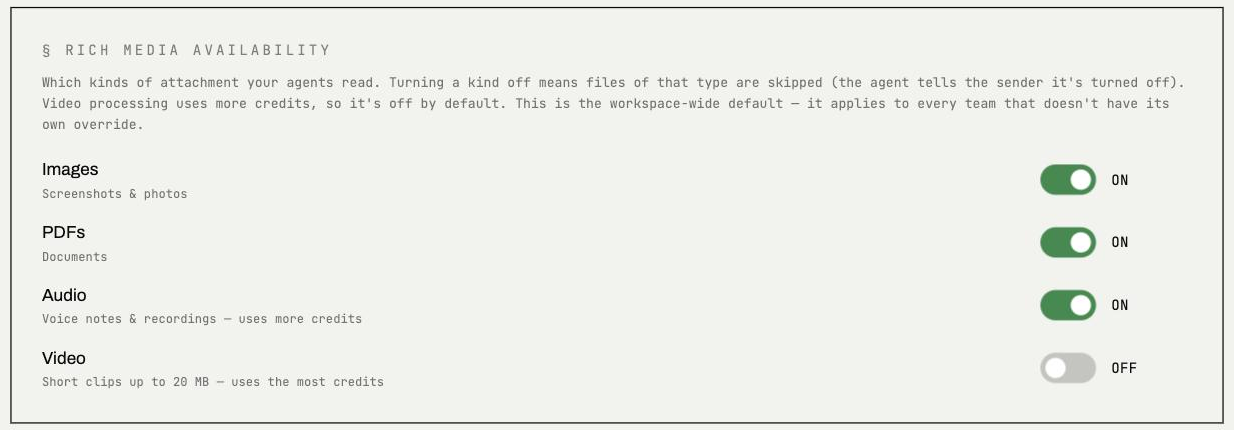
Video — short screen recordings and clips (mp4, mov, and similar, up to 20 MB). The agent takes in both the spoken narration and what happens on screen. The headline use case is QA bug reports: a QA teammate (or AWK QA) records a screen capture of a defect — the spoken narration, the on-screen error, the repro steps, the moment it breaks — and hands the recording straight to the engineer agent, which watches it to understand the problem. No writing the bug up by hand. Video is off by default (it uses the most credits) — a team admin turns it on per team (see below).
@OG-Awk [screen recording of the bug] — what's going wrong here?
Images, PDFs, and audio work today across both Slack and DMs; video works too, enabled per team.
Per-team media controls
Admins control which media types each team can use, to manage cost. From the team's settings in the console you can turn images, PDFs, audio, and video on or off per team. Images, PDFs, and audio are on by default; video is off by default (it uses the most credits) and is switched on here when a team wants it.
Models
Agents run on frontier LLMs from three providers:
- →Anthropic — Claude
- →OpenAI — GPT
- →Google — Gemini
Model selection is automatic based on task requirements.
All LLM access uses providers' commercial APIs (Anthropic, OpenAI, and Google) under business terms that prohibit training on your data. Your code, tickets, and email content are never used to train the providers' models. See the FAQ for more on data privacy.
How they work together
The agents operate as a team. A typical flow:
- →OG picks up a Jira ticket and starts building
- →OG opens a PR and hands off to QA
- →QA reviews the code and flags issues; merging requires your approval in Slack
- →Oracle tracks the ticket through the backlog and surfaces blockers
- →P.Chief keeps your inbox and calendar clear so you can focus
Handoffs between agents are always explicit — you see them happen in your Slack threads. No agent silently delegates to another.